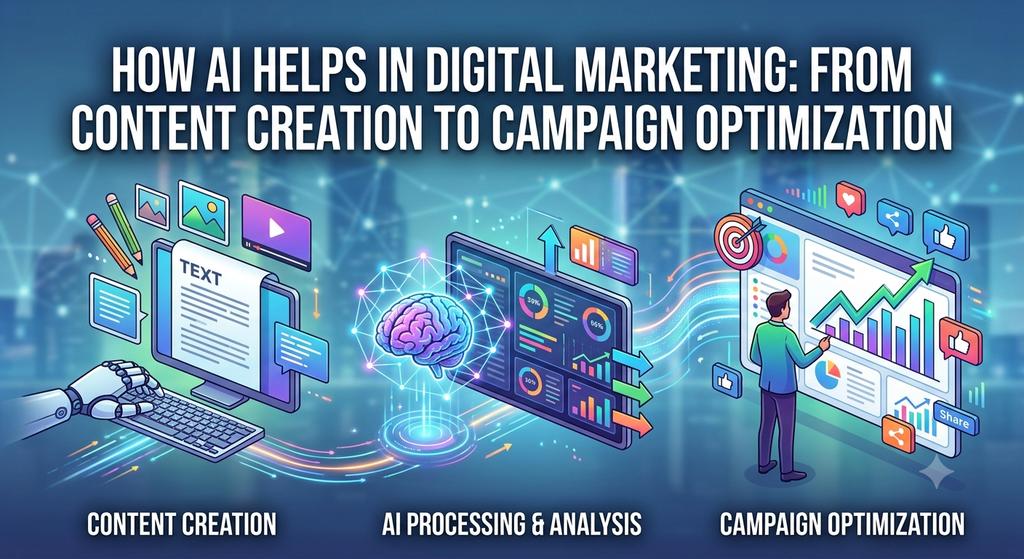
How AI Helps in Digital Marketing: From Content Creation to Campaign Optimization

How AI Helps in Digital Marketing

What is AI in Digital Marketing?

AI in digital marketing means using artificial intelligence to help businesses understand customers, automate marketing tasks, create content and suggestions, and improve advertising results.

For example, AI can analyze customer behavior and help marketers decide what content to show, who to target, and when to reach them for any website or APP.

Common uses of AI include:

  • Content creation: Writing social media posts, emails, blog posts, and ad copy.
  • Chatbots: Answering customer questions automatically.
  • Personalization: Recommending products or content based on a customer’s interests.
  • Advertising: Helping optimize audiences, budgets, and ad campaigns.
  • Data analysis: Finding patterns in website traffic, sales, and customer behavior.
  • SEO: Supporting keyword research, content optimization, and search-intent analysis.
  • Email marketing: Personalizing messages and helping determine effective timing and content.1

Example: An online clothing store can use AI to analyze what a customer has viewed or purchased and recommend products they may be interested in.

In short, AI in digital marketing = using intelligent software to make marketing more automated, personalized, and data-driven.

How AI will help in SEO

AI can help SEO by automating repetitive work, analyzing large amounts of data, identifying opportunities faster, and improving content quality. It doesn’t replace SEO strategy; it makes the SEO workflow more efficient.

AI could be helpful in the SEO work activities.

  • Keyword research and finding related keywords, entities, topics, and search intent
  • Search intent either queries by informational, commercial, navigational, etc
  • Content creation for creating briefs, outlines, drafts, and content variations
  • Content Optimization for identifying missing topics, entities, and semantic relationships
  • Title & Meta for generating and testing SEO title/description variations
  • Internal linking: implement and find relevant pages to link together
  • Technical SEO: finds and helps analyze large URL inventories and technical issues
  • For implementing programmatic SEO and helping generate structured metadata
  • Competitor Analysis: Analyzes competitors’ content and keyword coverage
  • GSC Analysis and finds patterns in clicks, impressions, CTR, and rankings
  • Content Refresh to identify outdated or declining content
  • SEO Reporting: Converts large datasets into actionable insights
  • Use of automation to connect SEO data with workflows

How AI Will Help in Content Creation Strategies

  • Find related search topics
  • Identify common questions users can ask
  • Group topics into a content cluster
  • Generate a content calendar
  • Create briefs for each article
  • Produce a first draft
  • Content headline suggestion based on SEO
  • Suggest SEO titles and meta descriptions.
  • Convert the article into social posts and an email

How AI Will Help in Social Media

AI is transforming social media marketing by helping brands create content faster, understand their audience, automate engagement, and optimize campaigns using data.

  • For content ideas to generate ideas based on trends, audience interests and past performance example: Suggests 20 Instagram/Reels topics
  • Caption Creation: Creates platform-specific captions
  • Content creation helps create images, videos, scripts, and creatives
  • Social Media Calendar builds content calendars based on campaigns and objectives; for example: Creates a 30-day posting plan
  • Audience analysis to identify audience interests, behavior, and engagement patterns
  • Implement personalization to create content for different audience segments
  • Scheduling helps determine suitable posting times; for example, it suggests publishing windows based on historical engagement
  • Ad Optimization Helps analyze audiences, creatives, and campaign performance
  • AI can help turn that single piece of content into an Instagram carousel, a 30-second Reel script, an X post/thread, or a YouTube Shorts script

How AI Will Help for Campaign Optimization

  • Audience targeting identifies audience segments based on behavior and interests
  • Audience segmentation identifies for groups users according to their characteristics and actions
  • Ad Creative Optimization analyzes different creatives and messaging Example: Identifies which headline/image combination performs better
  • Budget allocation helps identify where the campaign budget is producing better results
  • Bid optimization uses performance signals to adjust bids
  • A/B testing to generate and compare multiple campaign variations
  • Real-time monitoring detects changes in campaign performance
  • Conversion prediction uses historical signals to estimate conversion likelihood
  • Personalization matches messages to audience behavior
  • Cross-channel optimization compares performance across channels
  • Customer journey analysis finds where users drop off
  • Performance reporting turns campaign data into actionable insights

AI analyzes the campaign and finds that:

  • Creative A gets the highest CTR
  • Audience B generates more qualified leads
  • Campaign C has a lower cost per lead
  • Mobile users convert more frequently
  • Users who watch 50%+ of a video are more likely to submit a form

Looking for help on how to use AI in your digital marketing activities? Connect with our team at TrueSEOHelp


10 Reasons You Need a Digital Marketing Strategy in 2024 For Business Success

Digital marketing strategies are continually evolving, and what’s effective in 2024 may differ from previous years. However, here are the top 10 digital marketing strategies that are likely to be important in 2024:

  • Content Marketing: High-quality, relevant content remains the cornerstone of digital marketing. Creating valuable blog posts, videos, infographics, and other content will continue to attract and engage audiences.
  • Video Marketing: Video content will be even more crucial. Platforms like YouTube, TikTok, and Instagram Reels offer excellent opportunities to connect with your audience.
  • SEO (Search Engine Optimization): Optimizing your website and content for search engines is a fundamental strategy that will never go out of style. Focus on voice search and featured snippets for better visibility.
  • AI and Automation: Leveraging artificial intelligence and automation tools for personalized marketing, chatbots, and data analysis can streamline your efforts and improve customer experiences.
  • Social Media Marketing: Social media platforms will remain key for building brand awareness and engaging with your audience. Focus on the platforms that align with your target demographic.
  • Influencer Marketing: Collaborating with influencers in your niche can help you reach a wider audience and build trust with consumers.
  • Chatbots and Messaging Apps: Using chatbots and messaging apps for customer support and engagement is becoming increasingly important. They provide instant communication and can improve the customer experience.
  • Email Marketing: Email marketing continues to be a cost-effective way to nurture leads and maintain customer relationships. Personalization and segmentation will be key.
  • Augmented Reality (AR) and Virtual Reality (VR): These technologies are becoming more accessible and can be used for immersive product experiences and interactive marketing campaigns.
  • Data Privacy and Compliance: As privacy regulations become more stringent, ensuring data privacy and compliance with laws like GDPR and CCPA will be essential. Building trust with customers by protecting their data is crucial.

Remember that the specific strategies you choose should align with your target audience, industry, and business goals. It’s also important to stay updated with the latest digital marketing trends and adapt your strategies accordingly.

Digital Marketing Carrier Growth in India 2023

As of my last knowledge update in September 2021, digital marketing was a rapidly growing field in India, and it’s likely to continue its growth in 2023. The digital marketing industry in India has been evolving due to increased internet penetration, smartphone usage, and the government’s Digital India initiatives. Here are some factors contributing to the growth of digital marketing careers in India in 2023:

  • Rising Internet Penetration: India has seen significant growth in internet users, especially in rural areas. This has created a vast online audience, making digital marketing an essential tool for reaching potential customers.
  • E-commerce Boom: The growth of e-commerce platforms in India has led to increased demand for digital marketing professionals. Online businesses rely on digital marketing to attract customers and increase sales.
  • Mobile Marketing: With the increasing use of smartphones, mobile marketing has become a focal point for businesses. Professionals specializing in mobile marketing, app marketing, and responsive design are in demand.
  • Social Media Dominance: Social media platforms are widely used in India. Companies are leveraging platforms like Facebook, Instagram, Twitter, and LinkedIn for brand promotion and customer engagement. Social media marketing experts are sought after.
  • Content Marketing: Content marketing is a significant component of digital marketing. Companies need skilled content creators, including writers, video producers, and graphic designers, to develop engaging content.
  • SEO and SEM: Search Engine Optimization (SEO) and Search Engine Marketing (SEM) continue to be vital for online visibility. Professionals with expertise in these areas are in demand to help companies rank well on search engines.
  • Data Analytics: Data-driven decision-making is crucial in digital marketing. Professionals who can analyze data, make insights, and optimize marketing campaigns are highly valued.
  • Freelancing and Remote Work: Many digital marketing roles can be done remotely or as freelancers. This flexibility in work arrangements has expanded opportunities for professionals across India.
  • Startup Ecosystem: India has a vibrant startup ecosystem, and many startups are focusing on digital marketing to reach their target audience. This provides additional job opportunities in the field.
  • Training and Education: Recognizing the demand for digital marketing skills, various institutes, and online platforms offer courses and certifications. This facilitates the growth of skilled professionals in the industry.

    To have a successful career in digital marketing in India in 2023, consider the following:
    • Continuous Learning: Stay updated with the latest trends, tools, and techniques in digital marketing through courses, webinars, and industry publications.
    • Certifications: Earning certifications in areas like Google Ads, Google Analytics, Facebook Blueprint, and others can enhance your credibility.
    • Networking: Build a professional network by attending industry events and joining relevant online communities.
    • Specialization: Consider specializing in a specific area of digital marketing, such as social media marketing, SEO, content marketing, or data analytics.
    • Experience: Gain practical experience through internships or freelance work to build your portfolio.
    • Adaptability: Be adaptable as the digital marketing landscape continues to evolve.

      Digital marketing offers numerous career opportunities in India, and its growth is likely to continue in 2023 and beyond as businesses increasingly rely on online channels to connect with their target audiences.

    How To: Search on Google, Search Images, Delete Google Search History

    Google
    Google: How To Search

    How to search on Google

    Searching on Google is a straightforward process. You can use the Google search engine by following these steps:

    Open Your Web Browser: Launch your preferred web browser (e.g., Google Chrome, Mozilla Firefox, Safari).

    Navigate to Google: In the address bar at the top of the browser, type in “www.google.com” and press Enter to visit the Google homepage.

    Enter Your Search Query: On the Google homepage, you’ll see a search bar in the middle of the page. Click on it to activate it. Type in the keywords or phrases related to the information you’re looking for.

    Hit Enter or Click “Google Search”: After entering your search query, you can either press the “Enter” key on your keyboard or click the “Google Search” button to initiate the search.

    Browse Results: Google will then display a list of search results that are relevant to your query. The results are usually displayed in order of perceived relevance, as determined by Google’s search algorithm.

    Refine Your Search: If you’re not finding exactly what you’re looking for in the initial results, you can try refining your search query by using more specific keywords or adding additional terms.

    Use Filters: Google also provides various filters and tools to help you narrow down your search. These include image, video, news, and map searches, as well as time-based filters and advanced search operators.

    Click on Results: To access a specific website or page from the search results, simply click on the blue link provided. This will take you directly to the webpage with the relevant information.

    Back to Results: If you need to go back to the search results page, you can use your browser’s back button or the “Back to results” link provided at the top of the clicked page.

    Explore Additional Features: Google often provides additional features like “People also ask,” “Related searches,” and “Featured snippets” that can help you find more information on your topic.

    Remember that Google’s search results are based on algorithms that determine the relevance of web pages to your search terms. If you’re not finding what you need, you might consider using different search terms, checking different sources, or adjusting the filters to get more accurate results.

    How to delete search history on Google

    To delete your search history on Google, you can follow these steps:

    Open Your Web Browser: Launch your web browser and go to the Google homepage (www.google.com).

    Sign In (if not already): If you’re signed in to your Google account, your search history might be tied to that account. Make sure you’re signed in with the account you want to clear the search history for.

    Access Google Account Settings:

    Click on your profile picture or initials in the top-right corner of the Google homepage.
    From the dropdown menu, click on “Manage your Google Account.” This will take you to your Google Account settings.
    Go to Data & Personalization:

    In your Google Account settings, click on the “Data & Personalization” tab from the left-hand menu.
    Manage Your Activity:

    Under the “Activity and timeline” section, find the “My Activity” section and click on “Go to My Activity.”
    View Your Search History:

    You will see a chronological list of your recent Google activities, including search history, browsing history, and more.
    Delete Search History:

    To delete individual search entries, click on the three vertical dots (options menu) next to the entry you want to delete, and then click “Delete.”
    To delete multiple entries at once, click on the checkbox next to each entry you want to delete, then click the “Delete” button at the top of the page.
    To delete all your search history, click on the “Delete activity by” link on the left sidebar.
    Choose Time Range:

    In the “Delete Activity” window, you can choose a time range for the data you want to delete. You can select options like “Last hour,” “Today,” “Yesterday,” “All time,” or a custom date range.
    Confirm Deletion:

    After selecting the time range, click on the “Delete” button. Google will ask you to confirm the deletion. Once confirmed, your selected search history data will be permanently deleted.
    Remember that clearing your search history removes your search queries and associated activities from your Google Account, but it doesn’t necessarily remove all traces of your online activity. Websites you’ve visited might still have their own records, and your internet service provider (ISP) may also retain some data.

    Also, please note that the steps mentioned are based on the information available as of my last training cut-off in September 2021. Google’s interface and options may change over time, so you might want to refer to Google’s official support documentation for the most up-to-date instructions.

    How to search for an image on Google

    You can use Google’s “Reverse Image Search” feature to search for an image using an existing image as the search query. This can be helpful if you want to find the source of an image, similar images, or more information about a picture you have. Here’s how to do it:

    Go to Google Images:

    Open your web browser and go to Google Images (images.google.com).
    Upload or Paste the Image:

    There are two main ways to initiate a reverse image search:
    Upload an Image: Click on the camera icon in the search bar. This will open a dialog where you can either upload an image from your device or paste the URL of an image.
    Paste Image URL: If the image is already hosted online, you can right-click on the image and select “Copy image address.” Then, paste this URL into the search bar of Google Images.
    Perform the Search:

    After uploading the image or pasting the URL, click the “Search by image” button.
    View Search Results:

    Google will process the image and display search results that are related to the image you provided. These results might include websites where the image appears, similar images, and more.
    Refine Your Search:

    If you’re not finding the information you need, you can try using Google’s search tools to narrow down the results. For example, you can use the “Type” filter to look for images that are similar to a specific type (e.g., face, photo, clip art).
    Using reverse image search can help you discover more about an image, find its original source, or identify objects, people, or places depicted in the picture.

    Keep in mind that while Google’s reverse image search is powerful, it might not always be able to identify every image or provide accurate results, especially if the image is not well-documented on the internet.

    How to clear Google search history

    To clear your Google search history, follow these steps:

    Access Google Account Settings:

    Open your web browser and go to the Google homepage (www.google.com).
    Click on your profile picture or initial in the top-right corner of the Google homepage.
    From the dropdown menu, click on “Manage your Google Account.” This will take you to your Google Account settings.
    Go to Data & Personalization:

    In your Google Account settings, click on the “Data & Personalization” tab from the left-hand menu.
    Manage Your Activity:

    Under the “Activity and timeline” section, find the “My Activity” section and click on “Go to My Activity.”
    View and Delete Activity:

    You will see a chronological list of your recent Google activities, including search history, browsing history, and more.
    To delete individual search entries, click on the three vertical dots (options menu) next to the entry you want to delete, and then click “Delete.”
    To delete multiple entries at once, click on the checkbox next to each entry you want to delete, then click the “Delete” button at the top of the page.
    To delete all your search history, click on the “Delete activity by” link on the left sidebar.
    Choose Time Range:

    In the “Delete Activity” window, you can choose a time range for the data you want to delete. You can select options like “Last hour,” “Today,” “Yesterday,” “All time,” or a custom date range.
    Confirm Deletion:

    After selecting the time range, click on the “Delete” button. Google will ask you to confirm the deletion. Once confirmed, your selected search history data will be permanently deleted.
    Please be aware that clearing your Google search history removes the information from your Google Account, but it doesn’t necessarily remove all traces of your online activity. Websites you’ve visited might still have their own records, and your internet service provider (ISP) may also retain some data.

    Note that the steps provided are based on the information available as of September 2021, and Google’s interface or options may change. For the most up-to-date instructions, refer to Google’s official support documentation.

    AI: Know everything about artificial intelligence

    What is ai and what is ai definition?
    AI stands for Artificial Intelligence. It refers to the simulation of human intelligence in machines that are programmed to think and learn like humans. The main goal of AI is to create computer systems capable of performing tasks that typically require human intelligence, such as understanding natural language, recognizing patterns, learning from experience, problem-solving, and making decisions.

    Know everything about artificial intelligence

    AI can be classified into two main categories:

    1. Narrow AI (Weak AI): This type of AI is designed to perform specific tasks and is limited to those tasks only. Examples include virtual personal assistants like Siri or Alexa, image recognition systems, and recommendation algorithms used by online platforms.
    2. General AI (Strong AI): General AI refers to a system with the ability to understand, learn, and apply knowledge across a wide range of tasks, similar to human intelligence. This level of AI does not yet exist and remains a theoretical concept for now.

    The definition of AI is continually evolving as technology advances and researchers and developers make progress in creating more sophisticated and capable AI systems. The field of AI encompasses various subfields, including machine learning, natural language processing, computer vision, robotics, and expert systems, among others. AI has a broad range of applications across industries, including healthcare, finance, transportation, entertainment, and more.

    What is one of the main key principles of responsible ai

    One of the key principles of responsible AI is “Fairness.” Fairness in AI refers to the notion that AI systems should treat all individuals fairly and avoid any form of bias or discrimination based on characteristics such as race, gender, ethnicity, age, religion, or other protected attributes.

    To achieve fairness in AI, developers, and researchers must be aware of the potential biases that can be introduced into AI systems during data collection, model training, and decision-making processes. It is crucial to ensure that the data used to train AI models is diverse, representative, and free from any inherent biases. Additionally, the algorithms and models themselves should be designed and tested to minimize disparate impacts on different groups.

    By promoting fairness in AI, we can help prevent discriminatory practices and ensure that AI technologies are used ethically and responsibly to benefit everyone in society without reinforcing stereotypes or perpetuating inequalities. This principle is just one aspect of responsible AI, and other key principles include transparency, accountability, privacy, and security. Combining these principles helps guide the development and deployment of AI systems that align with societal values and respect the rights and dignity of individuals.

    How does ai work?
    AI works through a combination of data, algorithms, and computing power to simulate human intelligence and perform tasks that typically require human cognitive abilities. The process of how AI works can be broken down into several key steps:

    1. Data Collection: AI systems require vast amounts of data to learn and make informed decisions. Data can be collected from various sources, such as the internet, sensors, databases, and user interactions.
    2. Data Preprocessing: Before the data is used for training AI models, it needs to be cleaned, organized, and preprocessed. This step involves removing noise, handling missing values, and transforming the data into a suitable format for the AI algorithms.
    3. Machine Learning: Machine learning is a subset of AI that enables computers to learn patterns and make predictions from data without being explicitly programmed. There are different types of machine learning approaches, including:

    a. Supervised Learning: The AI system is trained on labeled data, where each data point has a corresponding target or label. The algorithm learns to map inputs to outputs by minimizing the error between its predictions and the actual labels.

    b. Unsupervised Learning: The AI system is given unlabeled data and must find patterns or groupings within the data without explicit guidance. Clustering and dimensionality reduction are common tasks in unsupervised learning.

    c. Reinforcement Learning: The AI system learns by interacting with an environment and receiving feedback in the form of rewards or penalties. The algorithm aims to maximize the cumulative reward over time by making better decisions.

    1. Model Training: In supervised and reinforcement learning, the AI model is trained using preprocessed data. During training, the model adjusts its internal parameters to improve its performance on the given task.
    2. Model Evaluation: After training, the AI model is evaluated using a separate dataset that it has not seen before. This evaluation helps determine how well the model generalizes to new, unseen data and whether it performs the task effectively.
    3. Deployment: Once the AI model has been trained and evaluated, it can be deployed to perform the intended task in real-world applications. This deployment can happen on servers, cloud platforms, or embedded within devices.
    4. Continuous Learning and Improvement: AI systems can continue to learn and improve over time by receiving new data and retraining the model periodically. This process is essential for keeping the AI up-to-date and adapting to changing conditions.

    Overall, AI systems work by processing large amounts of data, learning from it, and using the acquired knowledge to make predictions, classify information, generate responses, or perform other tasks, depending on the specific application and the type of AI model used.

    Can ai replace human intelligence?

    As of my last update in September 2021, AI has made significant advancements in performing specific tasks that were once considered exclusive to human intelligence. AI systems can now excel at tasks like image and speech recognition, natural language processing, game playing, data analysis, and more. However, despite these achievements, AI is still far from replicating the full spectrum of human intelligence.

    AI currently operates under the concept of narrow or weak AI, meaning it is designed to perform specific tasks within a limited domain. While these AI systems can outperform humans in certain specialized tasks, they lack the broader cognitive abilities and understanding that humans possess.

    General or strong AI, which would have the ability to understand and learn across various domains at a human level, remains a theoretical concept and has not been achieved yet. Developing such a level of AI poses numerous scientific, technical, ethical, and philosophical challenges.

    Human intelligence is exceptionally complex and encompasses creativity, emotional understanding, common sense reasoning, consciousness, and a deeper understanding of context and meaning. AI, at its current stage, lacks these qualities and does not have emotions or consciousness.

    While AI can be powerful and transformative in many ways, it is not a substitute for human intelligence but rather a tool that can complement and enhance human capabilities. The ultimate goal is to use AI in ways that augment human abilities, solve complex problems, and improve our lives while adhering to ethical and responsible guidelines. As AI continues to advance, it is essential to consider its implications and ensure that its deployment aligns with societal values and human welfare.

    What are the 8 Types of Digital Marketing?

    There are several types of digital marketing strategies that businesses commonly use to promote their products or services online. Here are eight key types of digital marketing:

    • Search Engine Optimization (SEO): SEO involves optimizing a website to improve its visibility and ranking on search engine results pages organically. This includes keyword research, on-page optimization, link building, and other techniques to increase organic search traffic.
    • Pay-Per-Click Advertising (PPC): PPC advertising involves placing paid ads on search engines or other platforms, and advertisers pay a fee each time their ad is clicked. Examples include Google Ads, Bing Ads, and social media advertising platforms.
    • Social Media Marketing: This involves promoting products or services through social media platforms like Facebook, Twitter, Instagram, LinkedIn, and others. Businesses can create organic posts, engage with users, run paid ad campaigns, and leverage influencers to reach their target audience.
    • Content Marketing: Content marketing focuses on creating and distributing valuable, relevant, and consistent content to attract and engage a specific audience. This includes blog posts, articles, videos, infographics, ebooks, and more.
    • Email Marketing: Email marketing involves sending targeted messages to a group of people who have willingly subscribed to receive updates from a business. It is used for various purposes, such as delivering personalized content, promoting products, and nurturing customer relationships.
    • Influencer Marketing: Influencer marketing involves collaborating with influential individuals in a specific industry or niche to promote products or services. Influencers have a dedicated following, and their recommendations can significantly impact consumer behavior.
    • Affiliate Marketing: In affiliate marketing, businesses reward affiliates for each customer or visitor brought through their own marketing efforts. Affiliates typically earn a commission based on the sales or leads they generate.
    • Online PR and Reputation Management: This involves managing a brand’s online reputation and handling public relations activities through various digital channels. It includes monitoring online mentions, addressing customer feedback, and maintaining a positive brand image.

    These are just a few examples of the many types of digital marketing strategies available. Businesses often use a combination of these methods to reach their target audience and achieve their marketing goals.

    How to Write Heading of the Article

    Here are some tips on how to write a good heading for an article:

    • Make it clear and concise. The heading should give the reader a good idea of what the article is about. It should be short and to the point, and it should avoid jargon or technical terms that the reader may not understand.
    • Use keywords. The heading should include keywords that are relevant to the article’s topic. This will help people find the article when they are searching for information on that topic.
    • Be creative. A creative heading can help to grab the reader’s attention and make them want to read more. However, it’s important to make sure that the heading is still relevant to the article’s content.
    • Use a strong verb. A strong verb can help to make the heading more interesting and engaging. For example, instead of saying “How to Write a Heading,” you could say “Write a Heading That Will Get Noticed.”
    • Use active voice. Active voice is more engaging than passive voice. For example, instead of saying “The heading should be clear and concise,” you could say “Make the heading clear and concise.”
    • Avoid exclamation points. Exclamation points can make the heading seem too informal or even unprofessional.
    • Proofread carefully. Make sure that the heading is free of errors in grammar and spelling.

    Here are some examples of good headings:

    • How to Write a Heading That Will Get Noticed
    • The Secret to Writing Effective Headings
    • 5 Tips for Writing Headings That Grab Attention
    • How to Write Headings That Will Make Your Readers Click
    • The Ultimate Guide to Writing Headings

    By following these tips, you can write headings that are clear, concise, and engaging. This will help to ensure that your articles are seen and read by as many people as possible. Connect TrueSEOHelp for more information and Optimization for any verticle website.

    YouTube Interesting Facts You Might Not Know

    Listing out 15 interesting facts on YouTube, you must know what we are using in daily life.

    YouTube
    • YouTube is the 2nd most visited website in the world, after Google.
    • YouTube was originally a dating site.
    • The first YouTube video, titled “Me at the Zoo,” was uploaded on April 23, 2005, and featured co-founder Jawed Karim at the San Diego Zoo.
    • YouTube was acquired by Google in 2006 for $1.65 billion in stock.
    • As per Statista’s latest report, the total number of YouTube users worldwide is over 2.6 billion.
    • The most-viewed video on YouTube is “Baby Shark Dance,” with over 9 billion views as of April 2023.
    • YouTube is available in more than 100 countries and in over 80 languages.
    • YouTube’s mobile app is the second-most popular app in the world, after Facebook.
    • YouTube has created a new generation of celebrities, including PewDiePie, Shane Dawson, and Zoella, who have millions of subscribers and earn millions of dollars in ad revenue.
    • More than 70% of YouTube watch time comes from mobile devices.
    • India has the most YouTube users in 2023, estimated at 467 million.
    • An average YouTube visitor checks nearly nine pages per day.
    • YouTube is the most used social platform for research purposes among B2B decision-makers with 50.9% of users.
    • The maximum upload limit for a YouTube video is 256 GB or 12 hours.
    • Avril Lavigne was the first artist to reach 100 million views on YouTube.

    How ChatGPT can help to write story headlines

    As an AI language model, I can assist in generating story headlines in a variety of ways. Here are some suggestions:

    • Based on a topic or keyword: You can provide me with a topic or keyword related to your story, and I can generate multiple headlines based on that. For example, if you tell me the topic is “climate change,” I can suggest headlines such as “How Climate Change is Affecting Coastal Cities” or “Why Climate Change Requires Urgent Action.”
    • Based on a tone or style: You can tell me the tone or style you want for your story, and I can generate headlines that match that tone. For example, if you want a humorous headline, I can suggest “The Top 10 Ridiculous Excuses for Not Recycling.” If you want a serious tone, I can suggest “The Dire Consequences of Ignoring Climate Change.”
    • Based on existing headlines: You can provide me with some examples of headlines you like, and I can use those as inspiration to generate similar headlines. For example, if you like the headline “The Shocking Truth About Plastic Pollution,” I can suggest “The Surprising Facts About Microplastics in Our Oceans.”
    • Based on news trends: If you want to create a headline that is timely and relevant, I can analyze current news trends and suggest headlines that are likely to grab attention. For example, if there is a current event related to climate change, I can suggest a headline that ties into that event.

    Overall, my ability to understand language and generate creative headlines can be a valuable resource in helping you write compelling and effective story headlines. Need any more information on how to write and the advantage and disadvantages connect with us for digital marketing services?

    Best Way To Handle Instagram Social Platform For Brand Awareness

    To handle Instagram social platform for brand awareness, you should consider the following best practices:

    • Define your brand’s unique voice and aesthetic – it’s essential to create a consistent look and feel for your brand on Instagram. Your brand’s personality should be reflected in your content, captions, and visual elements.
    • Use high-quality images and videos – Instagram is a highly visual platform, so it’s crucial to use high-quality images and videos that capture your brand’s essence.
    • Post consistently – Consistent posting is key to building your brand’s presence on Instagram. Create a content calendar that outlines the frequency and timing of your posts.
    • Utilize Instagram Stories – Stories are a great way to showcase your brand’s personality and engage with your followers in a more casual, behind-the-scenes way.
    • Use relevant hashtags – Hashtags are a great way to increase the discoverability of your content on Instagram. Research popular hashtags in your industry and use them in your posts.
    • Engage with your audience – Respond to comments and messages promptly and show your followers that you value their engagement.
    • Collaborate with influencers – Partnering with influencers can help increase your brand’s reach and credibility on Instagram.
    • Utilize Instagram Ads – Instagram Ads can help you reach a broader audience and drive more traffic to your website.

    By implementing these best practices, you can effectively handle Instagram social platform for brand awareness and build a strong presence on this platform. Connect the best tips for how to social media optimize.